Bw Small Logo
Bw Small Logo
  • About us
    • Back to menu
    • About us
    • Who We Are and What We Do
    • Careers at Business West
    • Sponsorship
    • Press office
    • Want to become a Member?

    • Join us
    • About membership
    • News
  • Advice & Services
    • Back to menu
    • Advice & Services

    • Starting in business
      • Back to menu
      • Starting in business

      • Business planning
      • Start up funding
      • Business premises and workspace
      • One-to-one support
    • Growing a business
      • Back to menu
      • Growing a business

      • Local Skills Improvement Plans
      • Social Economy West
      • AI Academy
    • Business innovation
      • Back to menu
      • Business innovation

      • Growth through innovation
      • Vision and strategy
      • Success stories
      • International partnering opportunities
    • Funding and finance
      • Back to menu
      • Funding and finance

      • Start up funding
    • International trade
      • Back to menu
      • International trade

      • ATA Carnets
      • Certificates of Origin
      • Customs Declarations
      • Letter of Credit services
    • Developing your workforce
      • Back to menu
      • Developing your workforce

      • Apprenticeships
      • Recruitment
      • HR support
  • Membership
    • Back to menu
    • Membership
    • Member benefits
    • Events Calendar
    • Our Community
    • Sponsorship
    • Member’s area

    • Members Directory
    • Members’ Events
    • Members’ Blog
    • Already a member?

    • Log in
    • Manage your account
    • Edit your profile
    • Upload a blog
    • Upload an event
  • Events & Training
  • Campaigns & Policy
    • Back to menu
    • Campaigns & Policy
    • Futures West
    • Quarterly Economic Survey
  • International Trade
    • Back to menu
    • International Trade
    • ATA Carnets
    • Certificates of Origin
    • Customs Declarations
    • Customs Documents
    • Letters of Credit Services
    • Training & Consultancy
    • Genesis
    • Santander Navigator
    Cars Bw (1)

    INTERNATIONAL TRADE

    Boost your profits with international customers

    International sales have provided substantial growth for thousands of UK businesses and right now demand for quality British products and services is on the rise all over the world. We’re here to help you take advantage of these opportunities.

    See how can we help
    • Blog
    • Resources
    • Member Directory
    • Contact us
Join us
Blog Resources Member Directory Contact us Join us
  • About us keyboard_arrow_down

        About us

      • Who We Are and What We Do
      • Careers at Business West
      • Sponsorship
      • Press office

      Want to become a Member?

      • Join us
      • About membership
      • News
  • Advice & Services keyboard_arrow_down

      Advice & Services

      • Starting in business
      • Business planning
      • Start up funding
      • Business premises and workspace
      • One-to-one support
      • Growing a business
      • Local Skills Improvement Plans
      • Social Economy West
      • AI Academy
      • Business innovation
      • Growth through innovation
      • Vision and strategy
      • Success stories
      • International partnering opportunities
      • Funding and finance
      • Start up funding
      • International trade
      • ATA Carnets
      • Certificates of Origin
      • Customs Declarations
      • Letter of Credit services
      • Developing your workforce
      • Apprenticeships
      • Recruitment
      • HR support
      Cars Bw (1)

      INTERNATIONAL TRADE

      Boost your profits with international customers

      International sales have provided substantial growth for thousands of UK businesses and right now demand for quality British products and services is on the rise all over the world. We’re here to help you take advantage of these opportunities.

      See how can we help
  • Membership keyboard_arrow_down

        Membership

      • Member benefits
      • Events Calendar
      • Our Community
      • Sponsorship

        Member’s area

      • Members Directory
      • Members’ Events
      • Members’ Blog

      Already a member?

      • Log in
      • Manage your account
      • Edit your profile
      • Upload a blog
      • Upload an event
  • Events & Training
  • Campaigns & Policy keyboard_arrow_down

        Campaigns & Policy

      • Futures West
      • Quarterly Economic Survey
  • International Trade keyboard_arrow_down

        International Trade

      • ATA Carnets
      • Certificates of Origin
      • Customs Declarations
      • Customs Documents
      • Letters of Credit Services
      • Training & Consultancy
      • Genesis
      • Santander Navigator
  • Home
  • Advice & Services
  • International trade
  • ATA Carnets
  • ATA Carnet Sectors
  • Guide to writing a general list for a film and TV Carnet

When writing a general list for a film and TV Carnet, you will need to make sure that you provide adequate detail about your cameras and film equipment. 

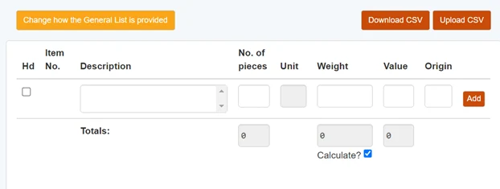
When you apply for your ATA Carnet, you will have the option to input the list information directly onto the general list field on your online application: 
Or you can upload the list as a CSV file: 
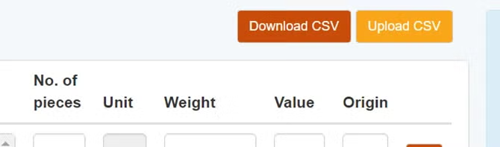
 

We recommend doing the latter, just so that you can prepare the list in advance. 


Your CSV file:

When creating your CSV file, you need to fill in the following columns:

1. Item description
This is where you need to list all key information about your item and clearly specify what it is. You need to provide enough detail so that customs will be able to easily identify your item when they are checking your Carnet. Terminology such as “Box of”, “Box containing”, “Assorted”, “Various”, “Accessories” and liberal use of the phrase “set of” (other than for cables) cannot be used as part of the description of goods, as they do not clarify what is actually being taken. 

2. Pieces
This is where you need to list the quantity of each item. You should only list more than one piece if the items in the item description are identical.

3. Unit
Enter the unit of weight such as ‘KG’ for kilograms or ‘G’ for grams. You should use the same unit of weight for each line item.

4. Weight
This is where you need to list the weight of the item. You can do this one of two ways:
•    List each individual item weight 
•    List the total weight (the sum of all item weights) in the ‘totals’ field within the application on SGS

5. Value
This is where you need to list the value of each item in GBP, and this should be the true commercial value of the item in the UK. The value must also reflect the price of the total number of items on that line.  

6. Origin
This is where you need to input the origin of the item (the country of manufacture of the item) using the ISO two-letter (Alpha-2) country code system. You can find the full list of ISO country codes here. If completing the general list directly on SGS as part of the application, rather than completing the excel CSV, you can select the origin country via drop-down menu.

7. Heading
This column denotes a 'heading' however, the use of headings on the general list is being removed in the near future therefore, please leave this column blank.

General lists for film and TV Carnets can often be the most complicated. This is because the lists are detailed and lengthy, and often comprised of hundreds of electrical cables and adaptors.

In order to simplify the process for customers, there are some general list ‘loopholes’ which can make writing your general list a bit easier:

  • You are able to list a ‘set of cables’ without also needing to specify how many are in the set. This goes against normal general list protocol, but is permissible by customs due to how frequently they see cables on ATA Carnets.
  • You are able to list a toolkit without also specifying what the kit is comprised of, as long as you also list the weight of the kit, and, if it costs over £150, how many items it contains. See our full guide to listing a toolkit here. 
  • If you do not know what an electrical item’s serial number is, you are able to list ‘NSN’ for ‘no serial number'.

An example of a general list for a film and TV ATA Carnet looks like this:  
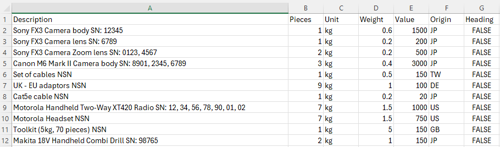
If you have any extra queries about writing your Carnet list, please get in contact with the Carnet team. 

Guide to writing a general list for a film and TV Carnet

Stay up to date with Business West

Register now to receive the Business i and What's On newsletters to your inbox. Stay informed about the latest business news and events in your region.

Get started
  • About us
  • Careers at Business West
  • Advice & Services
  • Starting in business
  • Growing a business
  • Business innovation
  • International trade
  • Events & Training
  • About Membership
  • Community
  • Campaigns & Policy
  • Blog
  • Resources
  • Member directory
  • Login
  • Join Us

Follow us on social media

  • Facebook Facebook
  • YouTube YouTube
  • Linkedin Linkedin

Business West is the trading name of GWE Business West Ltd. 
Registered Address: Leigh Court Business Centre, Abbots Leigh, Bristol, BS8 3RA. Email: info@businesswest.co.uk Company No: 6399340. VAT No: 125446033

© 2026 Business West. All Rights Reserved.

Privacy Policy Terms and Conditions