Guide to writing a general list for an equine ATA Carnet
When writing a general list for an equine Carnet, you will need to make sure that you provide adequate detail about your horse and its equipment.
When you apply for your ATA Carnet, you will have the option to input the list information directly onto the general list field on your online application:
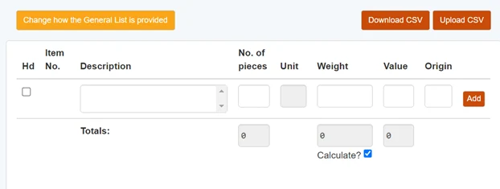
Or you can upload the list as a CSV file:
We recommend doing the latter, just so that you can prepare the list in advance.
Your CSV file:
When creating your CSV file, you need to fill in the following columns:

1. Item description
This is where you need to list all key information about your item and clearly specify what it is. You need to provide enough detail so that customs will be able to easily identify your item when they are checking your Carnet. Terminology such as “Box of”, “Box containing”, “Assorted”, “Various”, “Accessories” and liberal use of the phrase “set of” (other than for cables) cannot be used as part of the description of goods, as they do not clarify what is actually being taken.
2. Pieces
This is where you need to list the quantity of each item. You should only list more than one piece if the items in the item description are identical.
3. Unit
Enter the unit of weight such as ‘KG’ for kilograms or ‘G’ for grams. You should use the same unit of weight for each line item.
4. Weight
This is where you need to list the weight of the item. You can do this one of two ways:
• List each individual item weight
• List the total weight (the sum of all item weights) in the ‘totals’ field within the application on SGS
5. Value
This is where you need to list the value of each item in GBP, and this should be the true commercial value of the item in the UK. The value must also reflect the price of the total number of items on that line.
6. Origin
This is where you need to input the origin of the item (the country of manufacture of the item) using the ISO two-letter (Alpha-2) country code system. You can find the full list of ISO country codes here. If completing the general list directly on SGS as part of the application, rather than completing the excel CSV, you can select the origin country via drop-down menu.
7. Heading
This column denotes a 'heading' however, the use of headings on the general list is being removed in the near future therefore, please leave this column blank.
Creating your equine CSV file
When you are listing your horse in the item description column, you will need to include the following details:
- The fact that it is a horse (or pony) – i.e. write ‘horse’ or ‘pony’
- Its registered name
- Its height (in hands)
- Its colour
- Its sex
- Its year of birth
- Its passport number
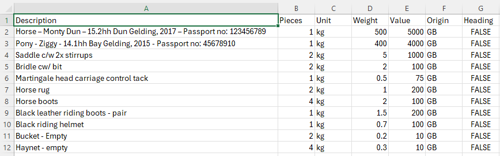
The listing should look something like this:
Horse – Monty Dun – 15.2hh Dun Gelding, 2017 – Passport no: 123456789
And the origin of the horse will always be the country in which it was born.
Additionally, when you are listing tack and additional equipment, you will need to be specific in your item descriptions. In particular, you will need to specify:
- Whether something is a horse boot or a riding boot, as well as whether these come in pairs
- That the horse rug is for horses – i.e. write ‘horse rug’ and not just ‘rug’
- That the buckets and haynets being taken are definitely empty
You don’t need to be too specific (i.e. you don’t need to provide brand names), but everything listed needs to be easily identifiable to customs and border forces.
An example of a general list for an equine ATA Carnet looks like this: